Why this matters
You want someone searching for help to discover your article, newsletter, service, or product. They might search on Google, ask ChatGPT or Perplexity, or use Google’s AI search features.
This lesson covers the foundations that make discovery possible:
- SEO (search engine optimization): improving visibility in search results.
- GEO (generative engine optimization): improving the chances that useful, credible content can be surfaced, linked, mentioned, or recommended in AI-generated answers.
| Important: Being indexed does not guarantee rankings. Being indexed also does not guarantee an AI citation. It simply gives your content a chance to be discovered. |
Start with one page
Choose one page for this lesson: an evergreen Substack post, a useful blog article, your homepage, a service page, or a product page. Pick something you genuinely want a new reader or client to find.
1. Check discovery and indexing
Search engines crawl pages to read them and may index them in their searchable database. AI search systems may retrieve relevant public sources when they build an answer. These are separate steps.
The three words to know
- Crawled: Google has visited the page.
- Indexed: Google has decided to store the page in its search database.
- Ranked: Google has chosen to show the page for a relevant search.
| Publishing a page is opening a shop. Crawling is Google walking past it. Indexing is Google adding it to its directory. Ranking is Google recommending it when someone asks for what you offer. |
A page cannot rank until it is indexed. Your first job is to make sure the important page is in the directory.
Quick check in Google
Search the following in Google, replacing the domain with your own:
site:yourdomain.com
For a specific page, add part of its title:
site:yourdomain.com “part of your page title”
This is only a quick signal. The more reliable check is Google Search Console.
Use Google Search Console
- Open Google Search Console and select your verified website or Substack custom domain.
- Paste the full page URL into the URL Inspection bar at the top.
- Look for “URL is on Google.” This means the page is indexed, although it is not a promise of rankings or a particular search appearance.
- If it is not indexed, expand the details and record the stated reason.
- Use “Test live URL” to check the current version of the page. A successful live test does not mean the page is already indexed.
- After a meaningful fix or update, use Request indexing once for an important page. Google decides whether and when to include it.

Example: “URL is on Google” in Search Console.
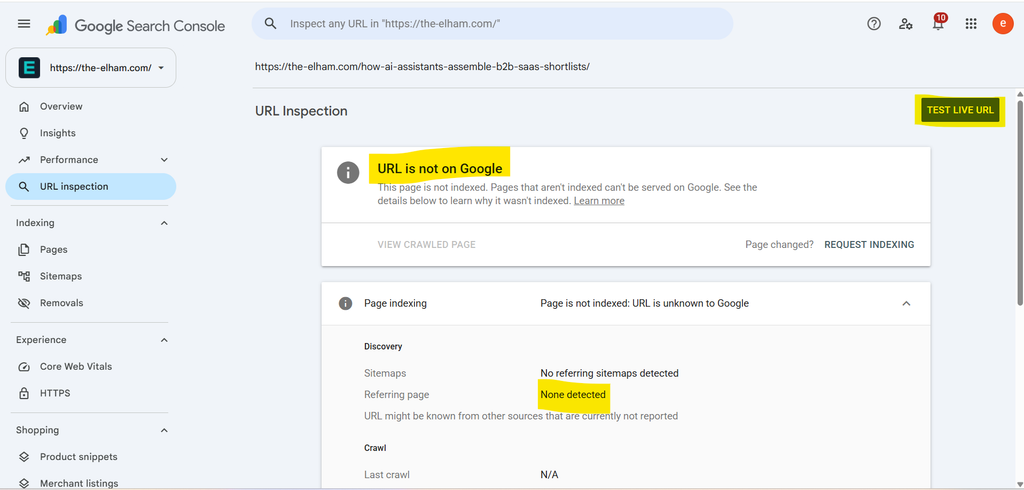
Example: record the reason if a page is not indexed.
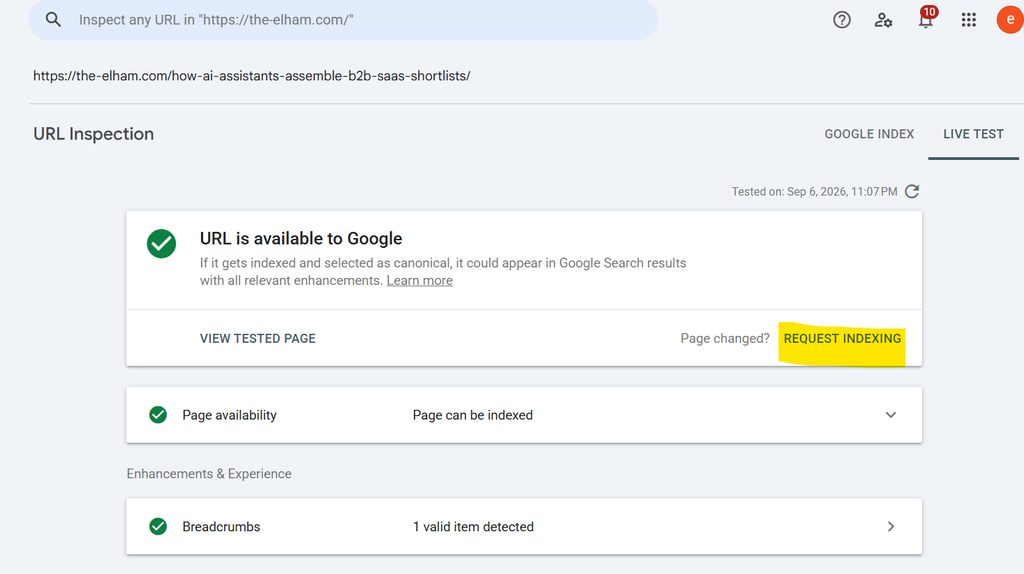
Example: the live URL test checks the current page, not whether it is already indexed.
If you already use Bing Webmaster Tools, inspect the same page there as an optional extra check. It gives you visibility into Bing’s ecosystem, including Copilot-related search experiences. Neither dashboard certifies your visibility across every AI service.
2. Check access for search engines and AI search
A page can look public to you but still contain instructions that restrict automated access. Two terms matter:
- noindex: asks supporting search engines not to include the page in their index.
- robots.txt: gives crawlers instructions about which parts of a site they may crawl.
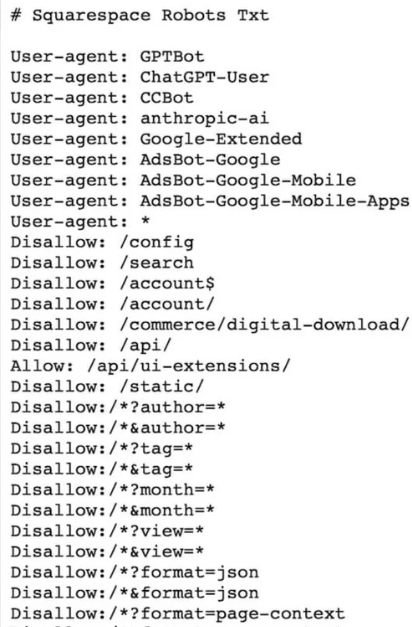
A robots.txt file gives crawlers instructions about which areas of a website they may access.
In a robots.txt file, User-agent identifies the crawler; Disallow restricts paths; and Allow creates an exception to a broader restriction. You do not need to edit this file for this course. You only need to know that accidental restrictions can prevent discovery.
| For content you want to be found, check that your articles and service pages are public and that your platform has not accidentally set them to private, unlisted, or “discourage search engines.” |
For AI search, permissions differ by service. For example, GPTBot relates to AI training, while OAI-SearchBot is used for ChatGPT search discovery. Allowing a crawler does not guarantee rankings or citations.
| Service | What to check |
| Google AI Overviews and AI Mode | The page is indexed, eligible for a search snippet, and included through Search Console’s Search generative AI setting. |
| ChatGPT search | OAI-SearchBot can access the public pages you want surfaced. |
| Perplexity search | PerplexityBot can access the public pages you want surfaced. |
If you do not manage robots.txt, security rules, or crawler settings, ask your website host or platform support:
| Please check whether legitimate Google, Bing, ChatGPT search, and Perplexity crawlers can access this public URL under our robots.txt and security rules. Please preserve our AI-training preferences. |
3. Help people understand your page at a glance
Discovery is not enough. When someone lands on the page from Google or an AI answer, they should quickly understand what it offers, who it is for, and why it is useful.
| Example: I help first-time authors improve the structure and flow of their books. |
- Use a clear, descriptive title.
- State who the page is for and the problem it helps solve near the beginning.
- Use short paragraphs and helpful headings.
- Add your name and a link to your About page.
- Put important information in readable text, not only inside an image.
- Make the next step clear: subscribe, enquire, buy, download, or read another relevant page.
Try this: open your page while logged out. Can a new visitor understand the main information and why it matters to them?
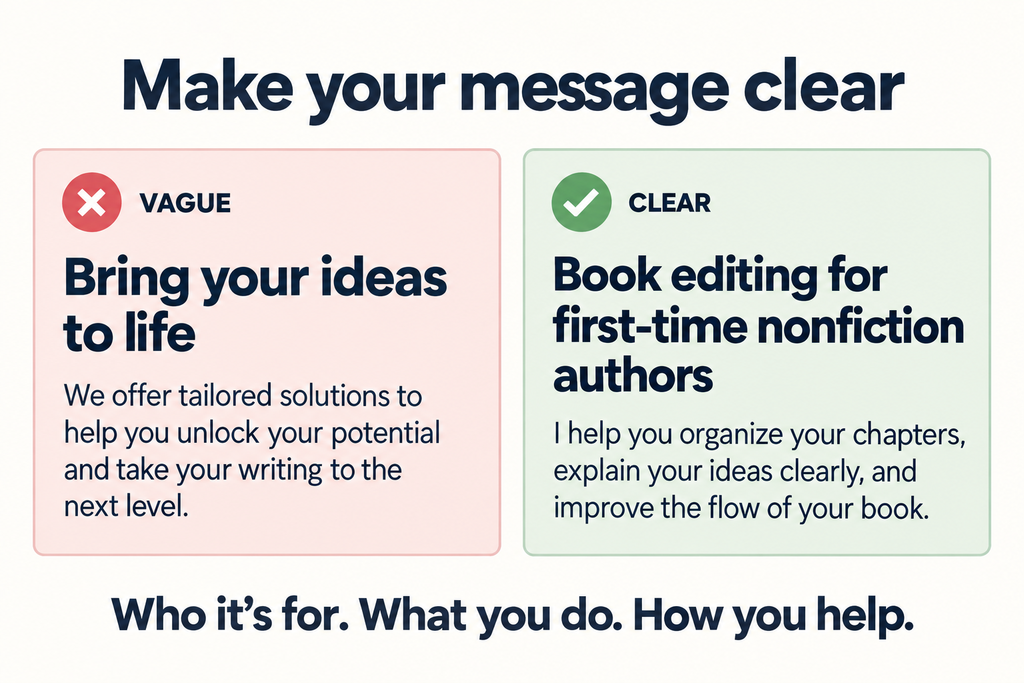
Example of a clear, scannable page layout.
4. Check loading, mobile usability, and HTTPS
Run your important page through Google PageSpeed Insights and look at the mobile results. You are not chasing a perfect score. You are looking for obvious problems that make the page slow or difficult to use.
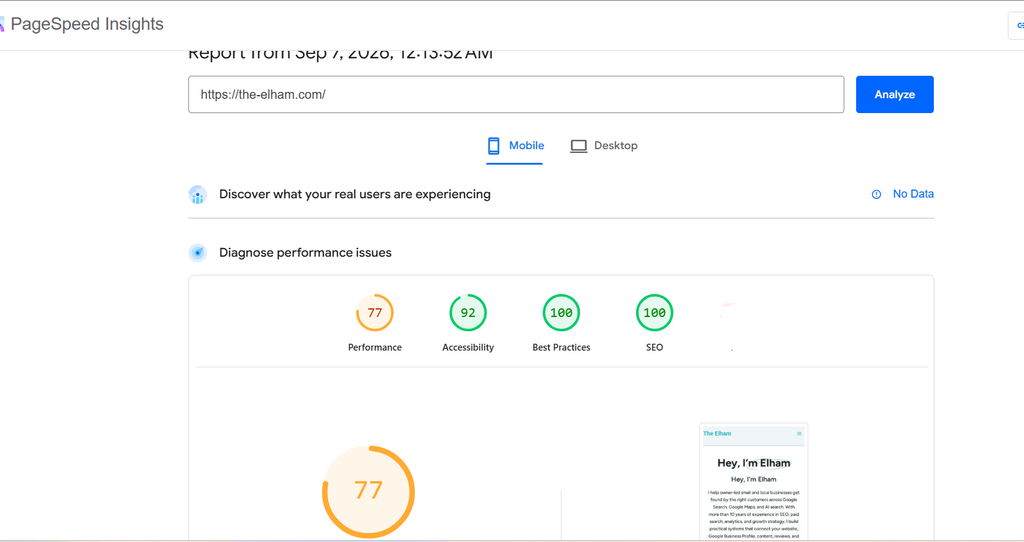
PageSpeed Insights helps identify major mobile performance issues.
| Measure | What it describes | Good target |
| LCP | Loading of the largest visible content | 2.5 seconds or less |
| INP | Response to an interaction | 200 milliseconds or less |
| CLS | Unexpected layout movement | 0.1 or less |
These Core Web Vitals measure visitor experience. They are not an AI-citation score. Small sites may not have enough real-user data; missing data is not a failure.
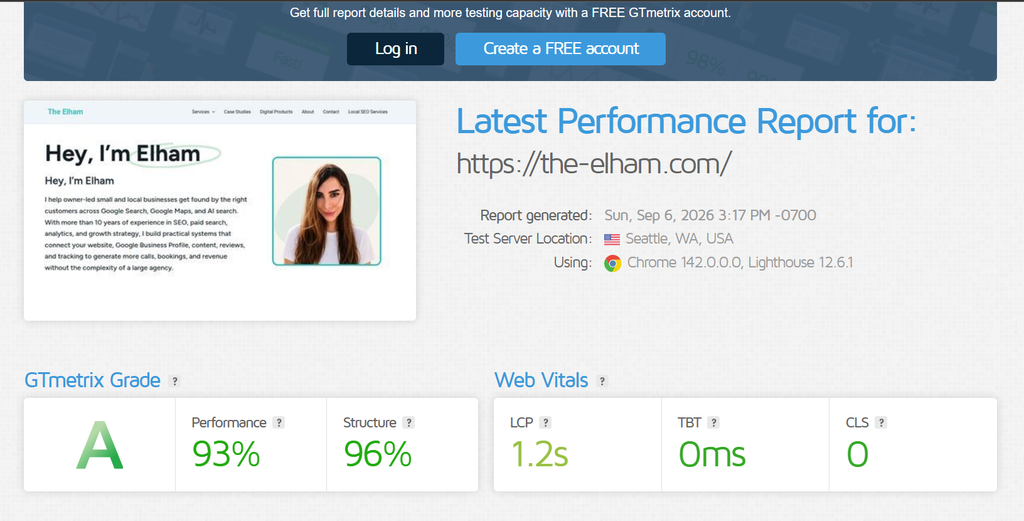
Example of a performance report. Use reports to find practical issues, not to chase perfect grades.
Start with one small fix at a time:
- Compress a very large image.
- Remove an unnecessary video, social feed, chat widget, or heavy script.
- Reduce unnecessary fonts or animations.
- Ask your host about caching or slow server response if the site still feels slow.
Then test the page on your own phone: Is the title easy to read? Are links and buttons easy to tap? Does the page scroll without major jumps? Does it load over HTTPS without a security warning?
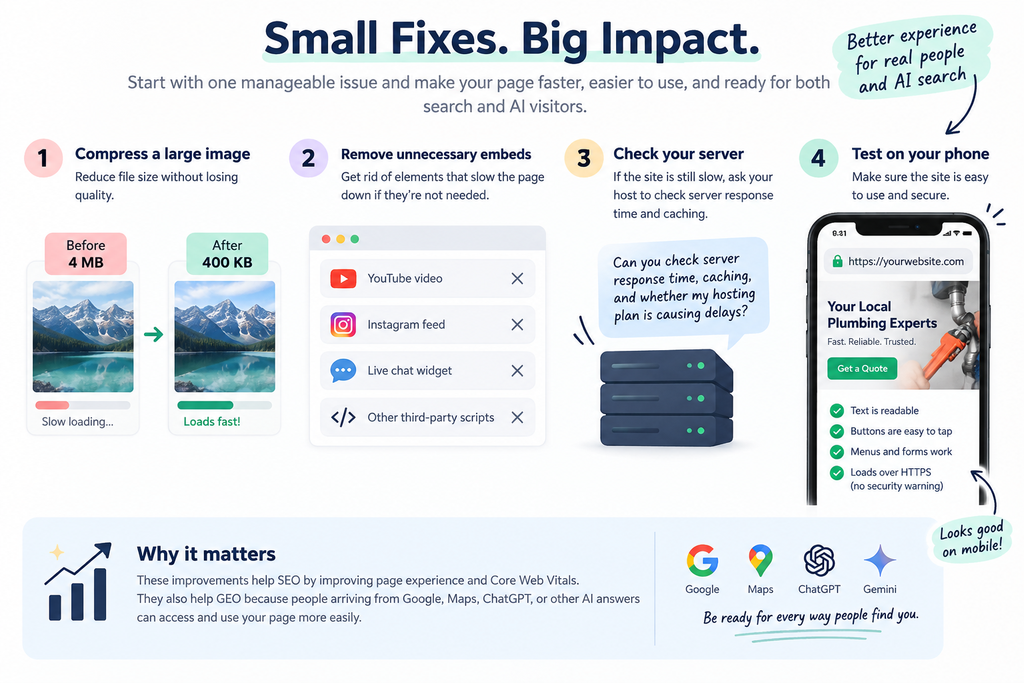
Use a real phone test as well as tool reports.
| Good enough rule: If the page is readable, stable, and reasonably fast on a normal phone connection, move on to content. Do not spend weeks chasing a perfect score. |
5. Make sure Google can find your sitemap
A sitemap is a file that lists the URLs you want search engines to discover. Most platforms create one automatically. You usually do not need to build one yourself.
- Visit https://yourdomain.com/sitemap.xml.
- If it opens, copy the address.
- In Google Search Console, open Sitemaps.
- Paste the sitemap URL and click Submit.
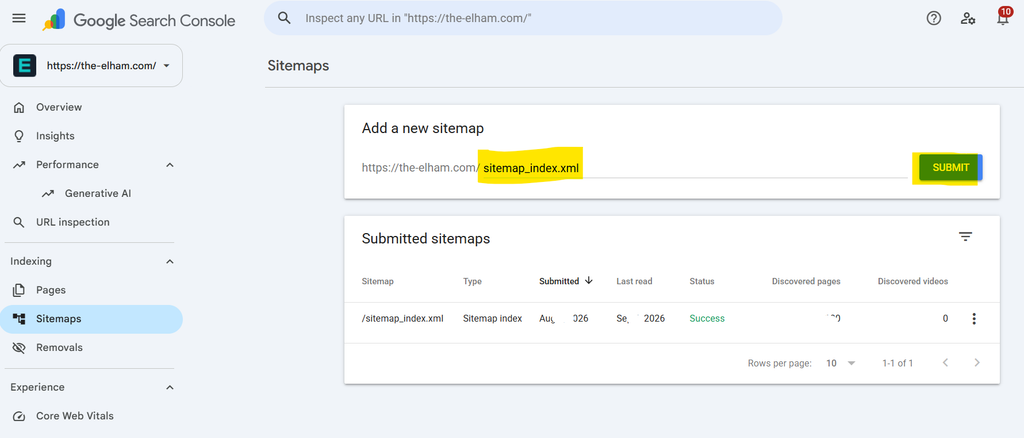
Submit a sitemap once in Search Console, then revisit it only if you change domains, platforms, or see crawl issues.
A sitemap does not force indexing. It helps Google discover URLs and understand which pages you consider important. A clean sitemap should include public, live, indexable pages that represent the main version of each URL.
6. Keep URLs stable and use one main version
A clear URL helps people understand what they are clicking and makes your site easier to manage. For example:
| Less helpful | Clearer |
| /post?id=982 | /seo-for-substack-writers |
| /blog/new-post-final-v2 | /how-to-find-content-topics |
| /services/marketing | /seo-content-strategy-for-consultants |
- Keep URLs short, lowercase, descriptive, and hyphen-separated.
- Avoid changing a live URL simply because you prefer a new title.
- If you must move a page, use a permanent 301 redirect to the closest relevant replacement.
- Do not redirect every removed page to your homepage.
The same content can sometimes be reached at several URLs: HTTP and HTTPS, www and non-www, trailing-slash variations, or tracking parameters. The preferred version is called the canonical URL.
- Ensure the site consistently uses either www or non-www.
- Ensure HTTP redirects to HTTPS.
- Avoid publishing identical articles at several locations on your own site.
- If you republish elsewhere, use a canonical option where supported or link clearly to the original.
- In Search Console URL Inspection, check the Google-selected canonical for one important page.
Modern platforms usually handle HTTPS and canonical tags automatically. Your job is to spot obvious duplication, not become a canonical-tag expert.
7. Check structured data—without overcomplicating it
Structured data, also called schema markup, is machine-readable information that helps search engines understand facts about a page: what type of page it is, who wrote it, when it was published, and which business or person is behind it. It often uses JSON-LD and the Schema.org vocabulary.
| Your goal: Check whether your platform already provides useful structured data, make sure it matches the visible page, and avoid adding unnecessary markup. |
| Schema type | Use it for | What it clarifies |
| Article / BlogPosting | Posts, guides, Substack articles | Headline, author, date, article type |
| Person | Personal brand, consultant, coach | Who is behind the content |
| Organization | Business, studio, agency, publication | The business behind the site |
| BreadcrumbList | Sites with clear categories | The navigation path |
| Product | A real ebook, template, course, or toolkit | What is being sold |
| Review | Genuine reviews with real review content | Accurate review information |
| FAQPage | A genuine FAQ with answers on the page | Question-and-answer content |
The rule: only mark up what is visible and true
- Do not add reviews or star ratings you cannot support.
- Do not mark up a product that is not actually sold on the page.
- Do not create fake FAQs just for schema.
- Do not use an author or business profile that does not match reality.
Schema can help a good page be understood more clearly and may support eligibility for certain enhanced search appearances. It is not a ranking shortcut and it cannot make unhelpful content rank.
Your 10-minute schema check
- Copy the URL of one important public page.
- Paste it into Google’s Rich Results Test.
- Review the result. Warnings are often optional fields, not emergencies.
- Use the Schema.org Validator if you want a wider view of the markup present.
- Confirm that the title, author, date, business name, product details, and FAQ content detected match the visible page.
- Record major errors for later or ask your developer/platform support if you cannot access the code.
Google Rich Results Test: https://search.google.com/test/rich-results
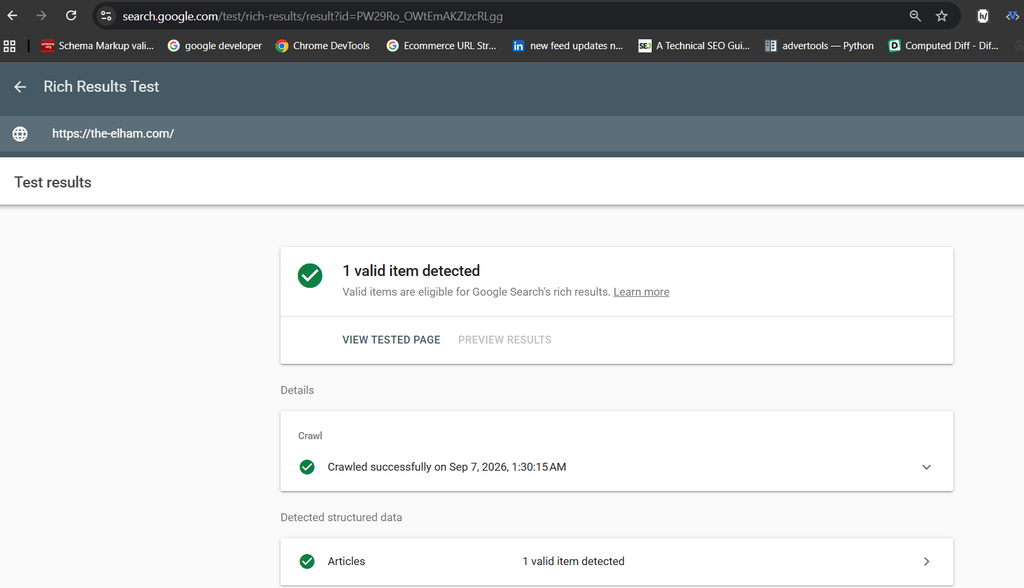
Schema.org Validator: https://validator.schema.org/
Useful FAQ sections still help readers, but do not add FAQ content merely to chase a special Google display. Prioritise clear answers for humans first.
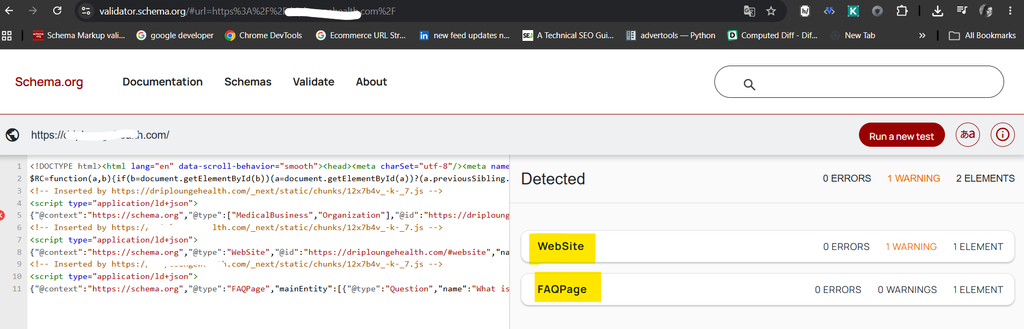
Schema and AI search: keep expectations realistic
Do not treat schema as a shortcut to being cited by ChatGPT, Perplexity, Gemini, or Google AI features. Google’s AI guidance says you do not need special AI schema, an AI-only version of your article, or an llms.txt file for Google AI search. Focus on public, clear, useful, well-structured content with real expertise instead.
If you publish on Substack
Substack handles much of the technical setup for you: hosting, HTTPS, basic page structure, and much of the underlying metadata. Use a free, public web article for this exercise, not a private, unlisted, or paid-only post.
- Check that the article is public and uses a clear, useful web title.
- Make sure the opening says who the content is for and what problem it solves.
- Keep key information in normal web text—not only inside images.
- Check that images support the explanation, important links work, and the byline is visible.
- Test the post on a mobile phone.
- If you use a custom domain, make sure the post appears correctly under that domain.
- Submit the publication sitemap to Search Console when available.
If you cannot access a crawler permission, canonical tag, or code-level schema setting, write “Needs platform confirmation.” Then contact support with the exact URL, the exact question, a screenshot if relevant, and the result you expected.
| Support request example: Can you confirm whether this public Substack post is available for search-engine crawling and includes the standard article metadata and canonical information? Here is the URL: [URL]. |
Your 40-minute technical practice
Complete this once for one important article, service page, product page, or Substack post.
| Time | Task |
| 10 minutes | Check Google indexing in Search Console. If already connected, check Bing too. Record whether the page is indexed, not indexed, or needs investigation. |
| 10 minutes | Check AI-search readiness: Is the core information public, readable as web text, specific, useful, and connected to a real author or business? Prepare a support question if crawler access is unclear. |
| 10 minutes | Check mobile experience and key links. Spot-check HTTPS, sitemap, canonical URL, and existing schema only where accessible. Run PageSpeed Insights if needed. |
| 10 minutes | Make one useful improvement: request indexing, fix a broken link, compress an image, improve a title, add an author bio or internal link, submit a sitemap, correct an inaccurate schema field, or send a support request. |
Use the final five minutes to document your work:
| What I checked | Evidence | Action taken | Follow-up date |
| Example: article indexed | Search Console: “URL is on Google” | Added one internal link | Check clicks/impressions in 30 days |
Completion goal
- You checked one important public page.
- You recorded evidence of what you found.
- You made one useful improvement or sent one specific support request.
- You chose a follow-up date.
| Keep perspective: Do not judge this exercise by a ranking, a traffic spike, or one AI answer that happens to mention—or miss—your work. Those outcomes develop over time. A documented check and one useful next action are a successful first step. |
Reply prompt: What is one technical or visibility check you completed today, and what is one question you still have about SEO or AI search?